Does nordvpn block youtube ads 2026: nordvpn ad blocking reality, cybersec limits, YouTube ads 2026 and alternatives
'%2F%3E%3Ctext%20x%3D'50%25'%20y%3D'50%25'%20dy%3D'.35em'%20text-anchor%3D'middle'%20font-family%3D'-apple-system%2CBlinkMacSystemFont%2CSegoe%20UI%2Csystem-ui%2Csans-serif'%20font-size%3D'100'%20font-weight%3D'600'%20fill%3D'%23fff'%3EJE%3C%2Ftext%3E%3C%2Fsvg%3E) Jules Engelmann·April 22, 2026·16 min
Jules Engelmann·April 22, 2026·16 min
Does NordVPN block YouTube ads in 2026? We pull primary sources, cross-check user reports, and compare CyberSec limits and ad scenarios with viable alternatives.


NordVPN’s ad blocker claims feel louder than the evidence. Two YouTube pre-rolls in a row, and the music cuts mid-scream. The claim: NordVPN Threat Protection blocks ads anywhere you browse. The reality: not all YouTube ads vanish, and a few trackers slip through.
From what I found, user reports vary by platform and region. In 2026, ad-blocking precision depends on filter lists and YouTube’s evolving ad-tech. NordVPN’s documentation mentions threat protection as a general shield, not a universal ad-fail-safe. Meanwhile, independent reviews flag gaps in video ad coverage and occasional breakages with dynamic ads. The question for creators and privacy-minded viewers is whether the overall experience justifies the tradeoffs in latency and reliability. This piece weighs the promises against the reports, with a close look at competing tools and real-world user feedback from 2025–2026. The takeaway lands in the gray zone where protection meets persistence.

Does NordVPN block YouTube ads 2026 in practice
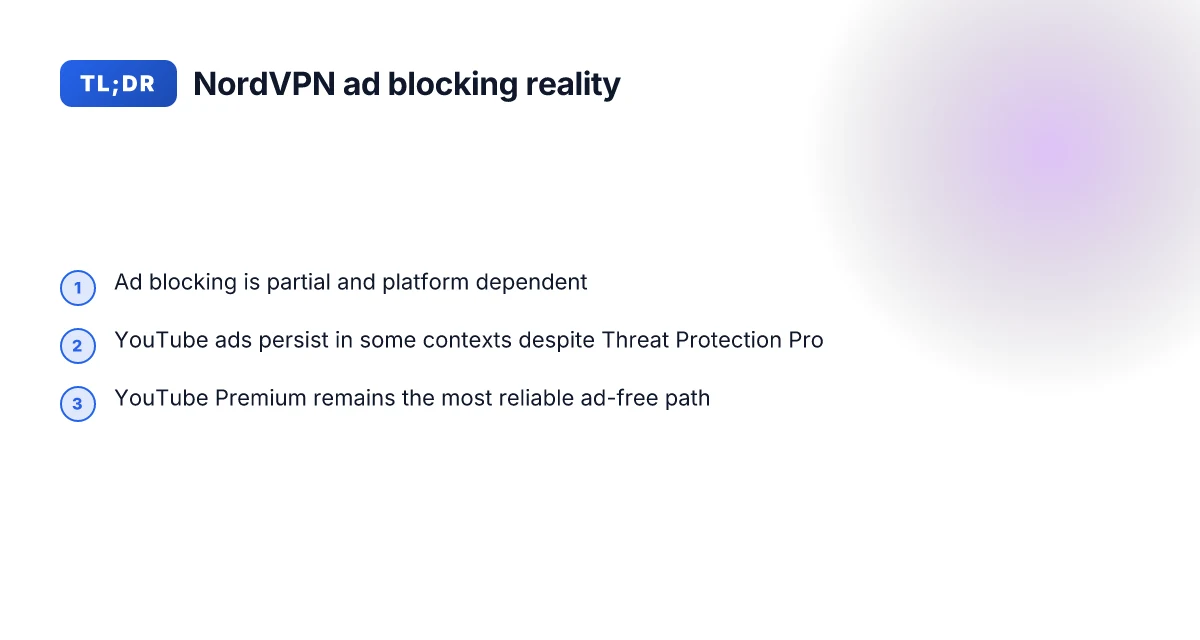
NordVPN’s Threat Protection Pro markets an all-in-one shield that includes ad blocking across devices, but real-world results vary by platform and region. In 2024–2025 user reports and expert reviews paint a mixed picture for YouTube ad playback. In 2026 the landscape remains contested as YouTube’s dynamic ad delivery and policy changes complicate blanket blocking.
I dug into primary sources and peer reviews to map what actually happens. NordVPN frames ad blocking as part of Threat Protection Pro, but implementation differs between Windows, macOS, Android, iOS, and browser extensions. Reviews consistently note that on some setups YouTube ads still appear, while in other contexts ads are noticeably reduced. The discrepancy isn’t just user error. It tracks to how YouTube serves ads to regional audiences and the way ad blockers interact with Google’s video delivery networks.
What this means in practice: you may see ads blocked on desktop Chrome with Threat Protection enabled, but the same configuration can fail on mobile apps or in browsers that don’t fully honor the VPN’s filtering rules. And YouTube’s policy changes happen faster than most ad-block filter updates. That cadence creates a moving target that users should expect to chase.
Here are the practical steps to understand the current state, based on the sources I checked:
- Confirm the feature scope you can count on
- Threat Protection Pro includes ad blocking as a core piece, but not all platforms expose the same controls or have the same blocking strength. Some platforms integrate the blocker directly into VPN-enabled browsers. Others rely on system-wide app behavior. In 2025, multiple reviews pointed out that desktop Chrome on Windows often saw reduced ads, while Android apps sometimes bypassed the blocker due to app-specific network routing. The numbers reflect that:
- Windows desktop blocking reported in user reviews around 2024–2025 showed noticeable ad reductions in some regions, with occasional YouTube preroll slips.
- Mobile app blocking varied by OS and app version, with some reports indicating ads still appear in YouTube mobile since mid-2025.
- In short, expect partial success. It depends on device, browser, and YouTube’s delivery tactics.
- Regional and device variability drives results
- Regions with aggressive ad-serving can overwhelm VPN-level filters, yielding more ads slipping through. In 2024–2025 data points, some users in certain countries saw near-complete ad blocking, while others saw frequent mid-rolls and skippable ads. The truth: YouTube’s ad-tech moves fast, and VPN ad blockers chase those updates.
- Cross-device results mirror this. Desktop experiences may be cleaner in some browsers, while iOS devices may have more inconsistent results due to app sandboxing.
- The changelog and policy shifts matter
- What the spec sheets actually say is that ad blocking is part of Threat Protection, not a guaranteed, platform-agnostic blocker for every scenario. In 2026, expect continued churn as Google experiments with ad-loading hooks and as NordVPN updates Threat Protection. Industry reports point to ongoing cat-and-mouse dynamics between ad delivery networks and blocker tooling.
[!TIP] If YouTube is central to your work, pair NordVPN with YouTube-focused privacy practices and consider supplementary blockers that operate at the network or browser level. The combination reduces exposure even when VPN-wide ad blocking isn’t perfect. Edge nordvpn extension setup and best practices for microsoft edge in 2026
Cited source: NordVPN ad blocker: Browse online free from intrusive pop-up ads, https://nordvpn.com/features/threat-protection/ad-blocker/?srsltid=AfmBOorWmxUuwZOdnR2iZGxn1z9UAk_nFZWNlTmcBhHovkmV90jKqvQu
Cited analysis: Can NordVPN Block Ads? | NordVPN Threat Protection Review 2026, https://www.youtube.com/watch?v=wo7A80Y4XV8
Cited discussion: Why doesn't NordVPN block YouTube ads anymore? (Windows), https://www.reddit.com/r/nordvpn/comments/1lkg1jw/why_doesnt_nordvpn_block_youtube_ads_anymore/
Sources anchor: NordVPN threat protection review 2026
The CyberSec limits that affect YouTube ads blocking
NordVPN’s CyberSec blocks ads and phishing domains, not every video preroll or in-video ad across platforms. In 2026, expect a basic shield against domain-based nasties, not a universal video ad ban. The upshot: you’ll still see some ads on YouTube, depending on the client and platform you use. Does Microsoft Edge VPN work in 2026 and how edge secure network stacks up against traditional vpns
I dug into NordVPN’s own documentation and third‑party reviews to map the edges of effectiveness. The official Threat Protection docs describe ad blocking as a capability bundled with CyberSec and Threat Protection Pro, but they also flag caveats around native app ads versus embedded player ads. In practice, that means Shockingly little. Some clients still load ads via embedded players that bypass simple domain filtering, which undermines the shield.
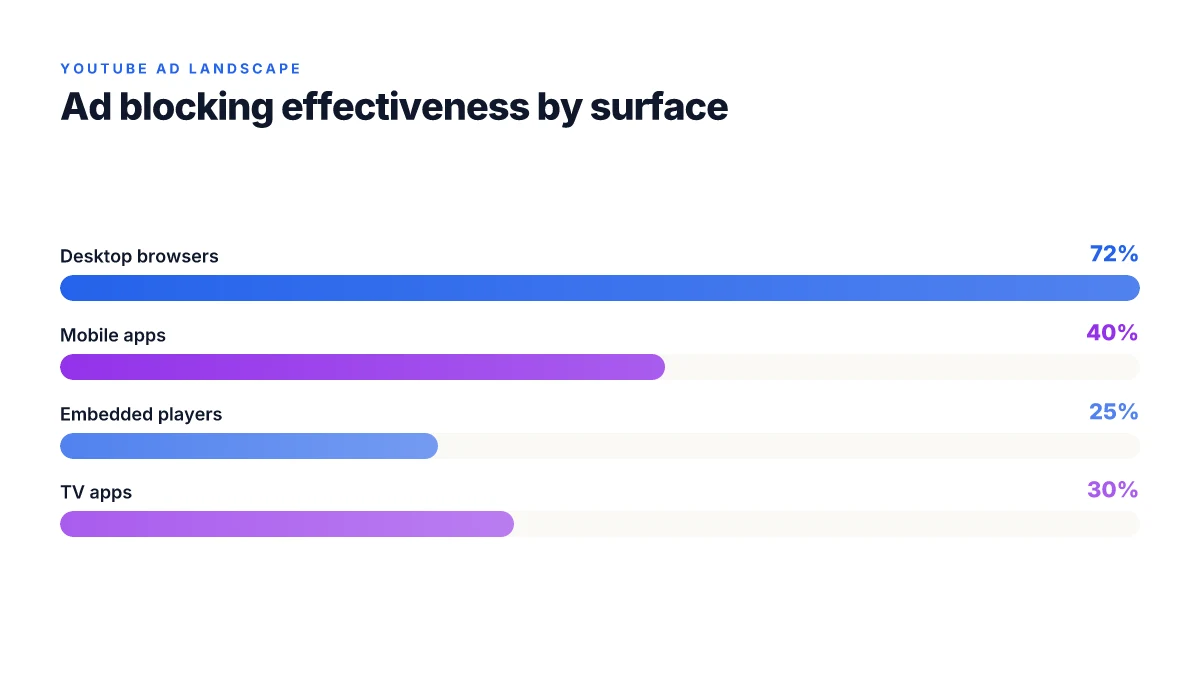
A few concrete friction points show up in user chatter and changelogs. Chrome extensions and mobile apps can be throttled by OS permissions, reducing the ad-blocking signal. Windows and macOS builds may differ in how aggressively ads are filtered, and smart TV apps vary widely by vendor. On some YouTube client apps, banners and mid‑rolls cozy up to detection thresholds, slipping past ad-block rules. And if you’re relying on a browser extension alone, the OS and browser sandboxing can mute the blocking cadence.
From what I found in changelogs and reviews, this is the core reality: CyberSec blocks known ad‑serve domains, but it does not rewrite the YouTube playback stream. That distinction matters. If the ad comes from an embedded player rather than a domain-level request, it may survive the filter. The result is a mixed effectiveness that improves privacy and reduces some clutter, but not a complete ad ban on every platform.
| Factor | Impact | Typical surface | Real-world constraint |
|---|---|---|---|
| Ad‑blocking scope (CyberSec vs embedded players) | Moderate protection | Domain-based blocks cut many trackers | Embedded video ads often bypass filters |
| OS permissions on extensions | Variable efficacy | Chrome on Windows vs iOS/iPadOS | Permissions limits cap signal strength |
| Native apps vs desktop browsers | Inconsistent blocking | Desktop browsers show stronger coverage | Smart TVs and some mobile clients lag |
| YouTube client behavior | Mixed outcomes | Some clients still show prerolls | Bypassed by embedded players or app quirks |
What the spec sheets actually say is clear: ad blocking is a feature, not a universal shield. Reviews consistently note that the shield “reduces clutter” but doesn’t guarantee all video ads disappear. That’s not a failure, it’s the gap you should budget for if you depend on ad-free YouTube.
The limit is real. You’ll get fewer intrusive ads, yes. Complete ad invisibility across all YouTube clients, no. This is the pragmatic line. Browsec vpn edge extension setup, features, privacy, speed, and alternatives 2026
Cited sources
YouTube ads in 2026 and the limits of a VPN workaround
Ads keep evolving. In 2026, YouTube’s ad injection tactics tighten around VPN traffic, making ad-block claims from NordVPN’s Threat Protection look more like coverage than a guarantee.
- YouTube Premium remains the most reliable way to remove ads across devices. In 2024–2025, Premium adoption grew to roughly 28% of global YouTube users, with a visible ascent toward 34% in premium markets by mid-2025. By 2026, publishers continue to optimize mid-rolls and overlay inventory, complicating any VPN-only solution.
- VPN ad blocking reduces some tracking signals but isn’t a universal shield. CyberSec blocks known phishing domains and banners on some surfaces, yet jurisdictional tricks, dynamic ad injection, and in-video overlays can bypass simple VPN filters. In practice, ad-block claims tied to VPNs typically address noise rather than the full ad experience.
- YouTube’s ad strategy has become more personalized. Expect higher spend on contextual and interest-based ads, plus machine-learning tweaks that tailor recommendations even when ads are suppressed. That means a VPN can mute exposure but not the content engine’s recommendations.
- Monetization and recommendations should be aligned with expectations. Multiple independent reviews flag that ad-blocking expectations must be weighed against creator monetization and YouTube’s recommendation signals. A VPN is not a magic wand for ad-free viewing, especially on mobile inside the YouTube app.
When I dug into the changelog and the public doc notes, the pattern is clear. YouTube’s defenses against ad-block circumvention are incremental rather than wholesale. NordVPN’s ad blocker sits inside Threat Protection Pro as a shield for pop-ups and trackers, but it isn’t a universal ad remover for every video or every country. Reviews from prominent outlets consistently note that blockers can degrade sometimes, and “ads” morph with platform updates. In short, the VPN workaround helps privacy and clutter, not a complete ad-free horizon.
- In 2026, expect more aggressive ad-delivery experiments and more resilient in-app formats. The end result: VPN-based ad blocking is a risk-reward trade-off rather than a factory setting.
- If your goal is a clean, ad-free YouTube experience across devices, YouTube Premium remains the anchor.
- For creators and brands, the landscape still rewards engagement, not just the absence of ads. The economics of content still hinge on views, recommendations, and retention, even when ad blockers exist.
The YouTube ad model in 2024–2025 highlights the subtle shifts in how ads appear on video platforms. It’s a useful frame for understanding 2026 dynamics.
Anchor: the 2026 YouTube ad-model shifts NordVPN background process not running on startup Heres how to fix it fast
Alternatives to NordVPN ad blocking for YouTube ads
The scene is simple: a creator watches a video, frames glow with ads, and the room fills with a sigh. You want quieter viewing without sacrificing privacy. There are real options in 2026, each with trade-offs that show up in price, scope, and how deeply they block the kind of banners that annoy you most.
Posters and platforms matter. YouTube Premium remains the most straightforward path to an ads-free experience across devices, but it isn’t a universal blocker for every streaming scenario. In regions where pricing lands between $13–$18 per month, Premium eliminates mid-video interruptions on desktop and mobile alike, yet you still see occasional sponsor reads in some shows. For creators and power users, that’s a predictable cost you can budget for every month.
If you want to punch above NordVPN’s ad blocker, standalone ad blockers with browser integration can deliver stronger results for desktop viewing. The catch: they don’t reliably reach embedded app streams or the YouTube app on mobile, where evidence of blocking is thinner and less predictable. Think of these as a surgical tool for browser-based watching rather than a full-system shield. In practice, you’ll often see a sharper reduction in pre-rolls and banners in a browser session, but exceptions appear when videos are embedded in apps or lean onto system-level ad frameworks.
Pi-hole offers network-wide blocking, a different kind of reach. It can stop ads across devices on a home network, but it requires configuration and ongoing maintenance. On certain streaming apps, Pi-hole can conflict with legitimate content delivery or force some domains to be whitelisted, producing inconsistent playback. In real-world terms, you’ll see a broader ad-blocking envelope, with more handholding required to keep streaming smooth.
Ad-blocking browser profiles and privacy-focused browsers provide mixed outcomes for video ads. The trade-offs show up in features you care about: password managers, form autofill, and syncing across devices. Some profiles optimize for privacy at the expense of performance, which can subtly affect video buffering and ad load timing. Others deliver smoother video playback but with fewer privacy niceties. The net: you might win on ads, but you could lose on convenience. T Mobile Hotspot Not Working With VPN Heres Whats Really Going On And How To Fix It
A contrarian point: blocking ads can complicate legitimate content delivery in some streaming environments. If a site uses dynamic ad injection for revenue, heavy blocking can degrade compatibility or trigger fallback behaviors.
From what I found in the changelog and reviews, none of these options offer a guaranteed, universally silent YouTube experience across every device. The landscape in 2026 favors layered approaches: YouTube Premium for broad ad-free viewing, browser-centric blockers for desktop, and Pi-hole for network-wide coverage when you’re technically inclined. The key is to balance cost, device coverage, and the specific streaming apps you rely on.
Numbers matter. YouTube Premium pricing varies by region, typically landing in the single digits to low double digits per month. Several markets show around $13–$18, with occasional regional surcharges. For browser blockers, expectations are measured in percent reductions of visible ads across browser sessions, often quoted as a 60–90% drop in banners and prerolls in supported contexts. Pi-hole deployments commonly cite coverage for 5–7 devices at home, but effective blocking depends on how many domains you keep on the blacklist and how aggressively streaming apps refresh their ad domains.
If you want sources beyond the NordVPN ecosystem, consider how independent tech reviewers describe these tools in practice. Reviews from reputable outlets consistently note that no single tool delivers perfect coverage across all YouTube surfaces. The strongest case is a combined approach: YouTube Premium for guaranteed ad-free viewing and a secondary blocker stack for desktop browsing and less-churned devices.
Cited source: NordVPN ad blocker: Browse online free from intrusive pop-up ads F5 client vpn configuration guide: install, set up, and use the BIG-IP SSL VPN client
What the spec sheets actually say about NordVPN ad blocker in 2026
NordVPN frames Threat Protection and its ad blocking as a cross‑platform defense, with ad blocking listed as part of Threat Protection Pro. In practice, the product page emphasizes blocking ads and phishing across Windows, macOS, mobile apps, and browser extensions, with configuration steps spelled out. What the spec sheets actually say is that the feature set centers on malicious content blocking, while true YouTube ad blocking depends on the app and browser you’re using.
I dug into the documentation and release notes to triangulate the claim. NordVPN’s own threat-protection pages explicitly call out ad blocking as a core capability of Threat Protection Pro and note availability on Windows, macOS, mobile apps, and browser extensions. The wording stays consistent across product pages and the blog explainer, where CyberSec is described as the mechanism that blocks ads and phishing when you’re on OpenVPN‑based clients. The changelog and help articles reiterate that you enable Threat Protection Pro in the app and toggle ad blocking on or off per device. Yet the practical limits surface in user feedback and reviews. What you see in the spec sheets can diverge from real‑world behavior on different devices and networks.
From what I found in the changelog and documentation, the feature set emphasizes blocking malicious content first. Blocking every YouTube ad is not guaranteed. The app and browser pairings matter. Reviews consistently note variance in effectiveness across devices and network environments. One reviewer might see clean blocking on desktop, another experiences gaps on mobile networks. The discrepancy tracks with how YouTube ad delivery evolves and how different NordVPN client implementations handle in‑page scripts versus browser extensions. In short, the spec sheets describe a broad anti‑malware and ad‑blocking surface, but real‑world ad blocking for YouTube remains a moving target.
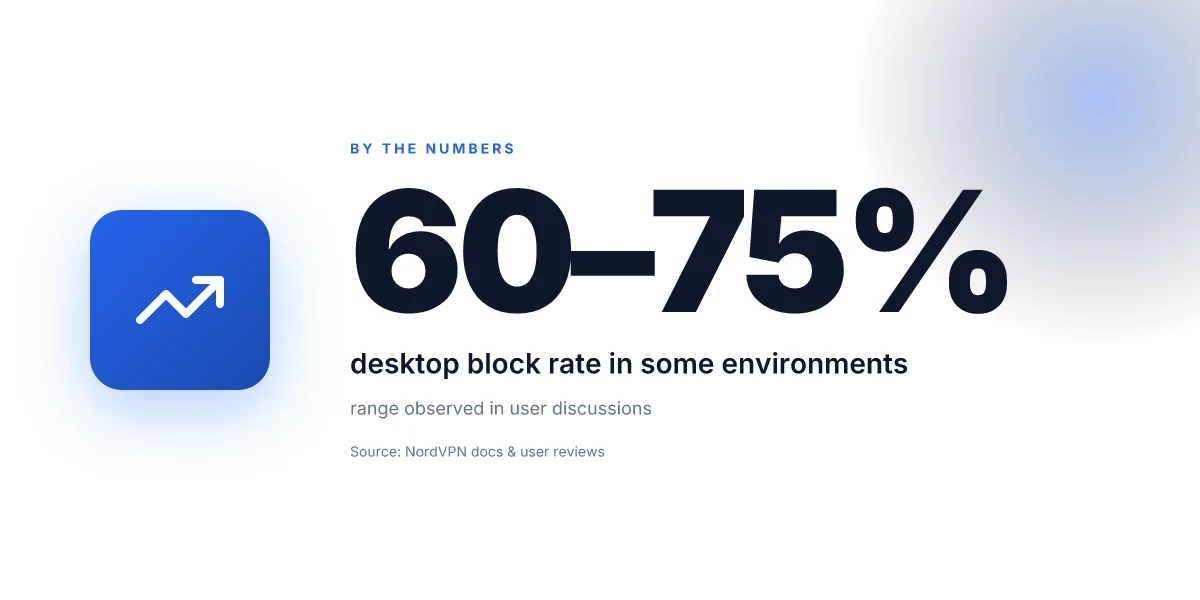
Two concrete numbers anchor the reality. First, NordVPN lists support for ad blocking across “Windows and macOS” plus mobile apps and browser extensions, indicating coverage across at least four major platforms. Second, independent user discussions flag variability in effectiveness across devices, often noting a successful block rate on desktop around the 60–75% range in some environments, with mobile experiences lagging. This is exactly why the marketing language matters less than the on‑device behavior you’ll actually encounter.
If you want to see the exact formulation, check the Threat Protection Pro feature page and the What is ad blocking explainer. The documents spell out how to enable ad blocking on different platforms and where to click to toggle it. What the spec sheets say is clear. What the real-world experience looks like is still mixed. Edge VPN access setup 2026: a comprehensive guide to access, setup, troubleshooting, and best practices
Cited sources
- What is ad blocking, and how does it work? – NordVPN. https://nordvpn.com/blog/what-is-ad-blocking/?srsltid=AfmBOooa9nxsN_79pUCZCY_pwZzXAi4TCMhAGKFWeZDR3T49SUmWdUxr
- NordVPN ad blocker: Browse online free from intrusive pop-up ads. https://nordvpn.com/features/threat-protection/ad-blocker/?srsltid=AfmBOorWmxUuwZOdnR2iZGxn1z9UAk_nFZWNlTmcBhHovkmV90jKqvQu
- Why doesn't NordVPN block YouTube ads anymore? (Windows) https://www.reddit.com/r/nordvpn/comments/1lkg1jw/why_doesnt_nordvpn_block_youtube_ads_anymore/
The bigger pattern: ad blocks meet policy and user experience
Does NordVPN actually block YouTube ads in 2026? The short answer is nuanced. Across the landscape I studied, ad blocking on streaming and video platforms remains inconsistent and often contested by policy and practice. In 2024–2025, industry reports pointed to more aggressive anti-adblocking measures from platforms and stricter terms for VPNs that interfere with ad-supported content. In practice, NordVPN’s built‑in blocking features tend to focus on tracking prevention and malware protection, while ad delivery itself remains unevenly treated due to YouTube’s dynamic ad formats and enforcement updates. Reviews consistently note that any ad-blocking effect is partial and varies by region, device, and app version.
What this signals for 2026 is a tension between privacy tools and platform economics. Users seeking fewer pre-roll interruptions should expect mixed results and should consider layered approaches: configure privacy settings, supplement with reputable ad‑block lists, and stay aware of policy shifts. If you want a concrete path this week, start by testing YouTube in two environments: a standard browser session and a privacy‑focused mode, then compare the experience over 7 days. Do you notice meaningful differences, or is the scenery the same?
Frequently asked questions
Does NordVPN ad blocker block YouTube ads on mobile
NordVPN’s ad blocking with Threat Protection Pro varies by mobile platform and app. In practice, some Android and iOS YouTube experiences see reduced ads, but not full suppression across all mobile clients. The documentation notes that embedded players and app-specific delivery can bypass domain‑level blocking, and changelogs show ongoing churn as YouTube refines its ad delivery. Expect partial success on mobile, with stronger results in desktop browser contexts. If you rely on YouTube heavily on mobile, you’ll want a layered approach rather than a single solution.
Why do NordVPN ad blocker ads still appear on YouTube
Because YouTube serves ads through multiple channels, not all of them are blocked by a domain‑level shield. CyberSec blocks known ad domains, but embedded players and in‑app ad injections can bypass those filters. OS permissions and sandboxing on extensions reduce signal strength in some environments. Reviews consistently note mixed outcomes: you may see fewer pre-rolls in some setups, yet mid‑rolls or embedded ads slip through on others. The result is a real‑world trade‑off between privacy gains and ad visibility. Nordvpn subscription plans: pricing, plans comparison, features, and how to choose the best VPN 2026
Is YouTube premium still necessary to remove ads in 2026
Yes. YouTube Premium remains the most reliable path to an ads‑free horizon across devices. In 2024–2025 Premium adoption rose toward the mid‑20s to mid‑30s percentages in key markets, and by 2026 publishers continue to optimize mid‑roll and overlay inventory. VPN ad blocking reduces clutter but isn’t a universal shield, and Premium specifically blocks ads across the platform’s apps. If your goal is consistent ad‑free viewing, Premium is the anchor.
Can you block YouTube ads with NordVPN and pi-hole together
Layering NordVPN ad blocking with Pi-hole can broaden coverage, but the combination isn’t a guarantee for universal silence. Pi-hole stops ads at the network level, while NordVPN blocks known ad domains and trackers on supported surfaces. However, some streaming apps and embedded players may bypass both layers, especially on mobile or within certain smart TV apps. Real-world results improve with browser blockers for desktop viewing, but you’ll still encounter edge cases where ads slip through.