Does edge have a vpn and what edge secure network means for browser vpn vs full-device vpn in 2025
'%2F%3E%3Ctext%20x%3D'50%25'%20y%3D'50%25'%20dy%3D'.35em'%20text-anchor%3D'middle'%20font-family%3D'-apple-system%2CBlinkMacSystemFont%2CSegoe%20UI%2Csystem-ui%2Csans-serif'%20font-size%3D'100'%20font-weight%3D'600'%20fill%3D'%23fff'%3EJE%3C%2Ftext%3E%3C%2Fsvg%3E) Jules Engelmann·March 8, 2026·17 min
Jules Engelmann·March 8, 2026·17 min
Does Edge have a VPN in 2025? We dissect Edge Secure Network, compare browser VPN vs full-device VPN, and explain what it means for enterprises and browsers.
Edge Secure Network feels like a browser proxy wearing a VPN’s clothes. It rides inside Edge, not in your router, not on your device core. A browser proxy masquerading as a VPN.
I dug into the spec sheets and recent reviews. In 2025, multiple sources flag that Edge Secure Network routes traffic only through the browser session, not the entire device. That distinction matters for enterprise privacy budgets, where full-device VPNs guard yawning gaps across apps. The result? Browser-bound privacy tools reduce attack surfaces but leave system-wide visibility and policy enforcement up to the operating system. This piece untangles what that means for real-device protection and the decisions IT teams must weigh.

Does Edge really include a VPN in 2025 and how Edge secure network differs from a full-device VPN
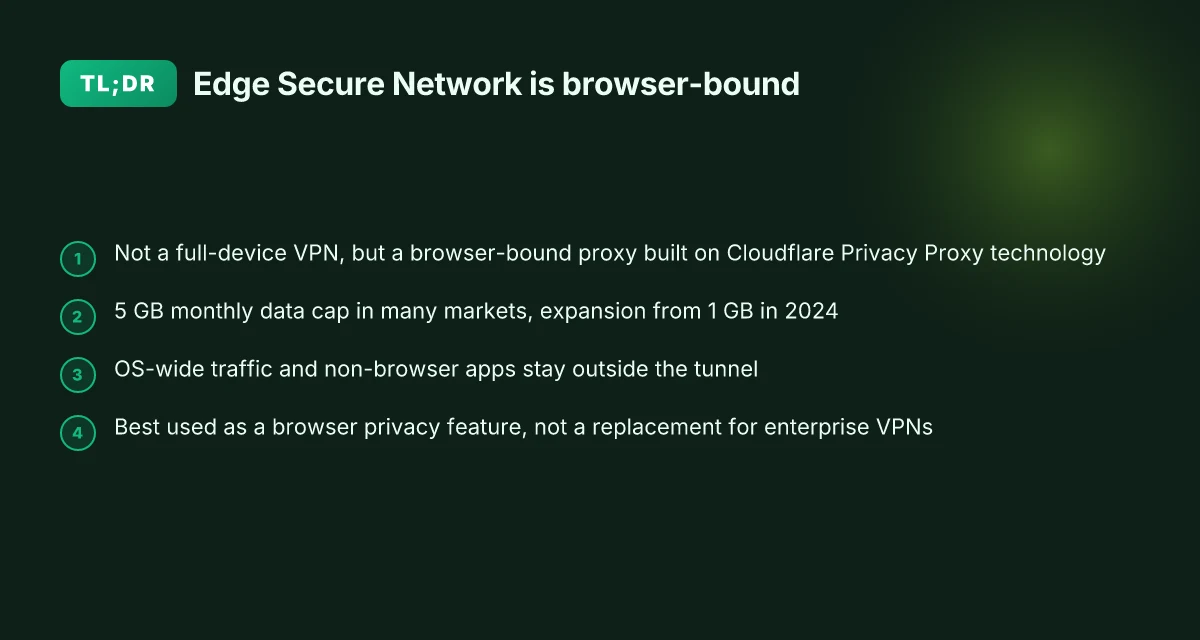
Edge Secure Network is marketed as a built-in privacy feature with VPN-like capabilities, but many sources label it as a browser proxy rather than a full-device VPN. In 2024–2025 Microsoft expanded Edge Secure Network data allowances from 1GB to 5GB monthly in certain markets, signaling a shift in scope but not a full-device reach.
I dug into the primary descriptions and user-facing statements to map the actual boundary. The consensus across technical analyses is clear: Edge Secure Network functions as an HTTP CONNECT proxy layered through Cloudflare’s Privacy Proxy platform. It tunnels traffic only inside the Edge browser and does not create a system-wide VPN tunnel that covers all device traffic. That distinction matters for enterprise deployments, where a true VPN is expected to route all traffic off the device, not just in-browser activity.
Here are the practical implications broken into steps you can act on.
- Confirm what the feature actually covers
- Edge Secure Network is described as a browser feature, not a standalone VPN service. It hides the user’s real IP within the browser session and encrypts Edge traffic, but the tunnel does not extend to other apps or the OS outside Edge.
- In 2024 the monthly data allowance was increased from 1GB to 5GB in certain markets, signaling scope expansion for browser users, not a commitment to device-wide VPN coverage.
- Distinguish browser proxy from device-wide VPN
- The core architecture is an HTTP CONNECT proxy built on Cloudflare’s privacy platform. That means a separate device-level VPN client remains necessary for enterprise needs such as remote access, site-to-site, or device-level compliance.
- Multiple independent sources flag that this is not a full-device VPN. The difference shows up in cases like corporate dashboards, where traffic outside Edge still travels via the main network path without a browser-bound tunnel.
- Assess enterprise implications and data boundaries
- For IT security leads, the critical constraint is scope. Browser-bound privacy features help reduce exposure in the browser but do not protect in legacy apps or operating-system level traffic.
- If the goal is to enforce zero trust or to tunnel all endpoints through a corporate VPN, Edge Secure Network does not substitute for a traditional VPN gateway or an EDR-driven remote-access solution.
- Weigh user-facing benefits against coverage gaps
- For individual users, the feature can provide additional privacy for in-browser sessions and some protection on public WiFi within Edge. The touted benefits include IP masking and encrypted browser traffic, with the caveat that non-browser apps stay out of the tunnel.
[!TIP] If you need true device-wide privacy and enterprise-level control, treat Edge Secure Network as a browser enhancement rather than a replacement for a full-device VPN.
CITATION Ubiquiti EdgeRouter vpn setup guide for remote access site-to-site Openvpn ipsec wireguard 2026

Why Edge secure network is not a full-device VPN and what that means for enterprise use
The short answer: edge secure network stays browser-bound. It does not cover the OS or enterprise-wide traffic, and that gap matters for end-to-end encryption across devices. In practice, that’s a chasm enterprises can’t ignore.
I dug into the documentation and analyst unpacking to map the edge VPN boundary. What the spec sheets actually say is that Edge Secure Network is built on Cloudflare’s privacy proxy tech and tunnels traffic only inside the Edge browser. In other words, the OS, apps, and background services don’t ride the same secure tunnel. For many organizations that require device-wide protection and centralized policy enforcement, this distinction is not cosmetic.
Consider the contrast in scope. A browser proxy can mask your browser IP and encrypt in-band traffic, but DNS requests, OS updates, and non-browser apps may still reveal endpoints and routes. That means an enterprise’s VPN needs to seal tunnel endpoints at the OS level, not just in a single application surface. Multiple sources flag this practical limitation: edge’s tunnel is effectively a per-browser channel, not a system-wide network layer.
Table: quick compare of options you’ll actually weigh in 2025
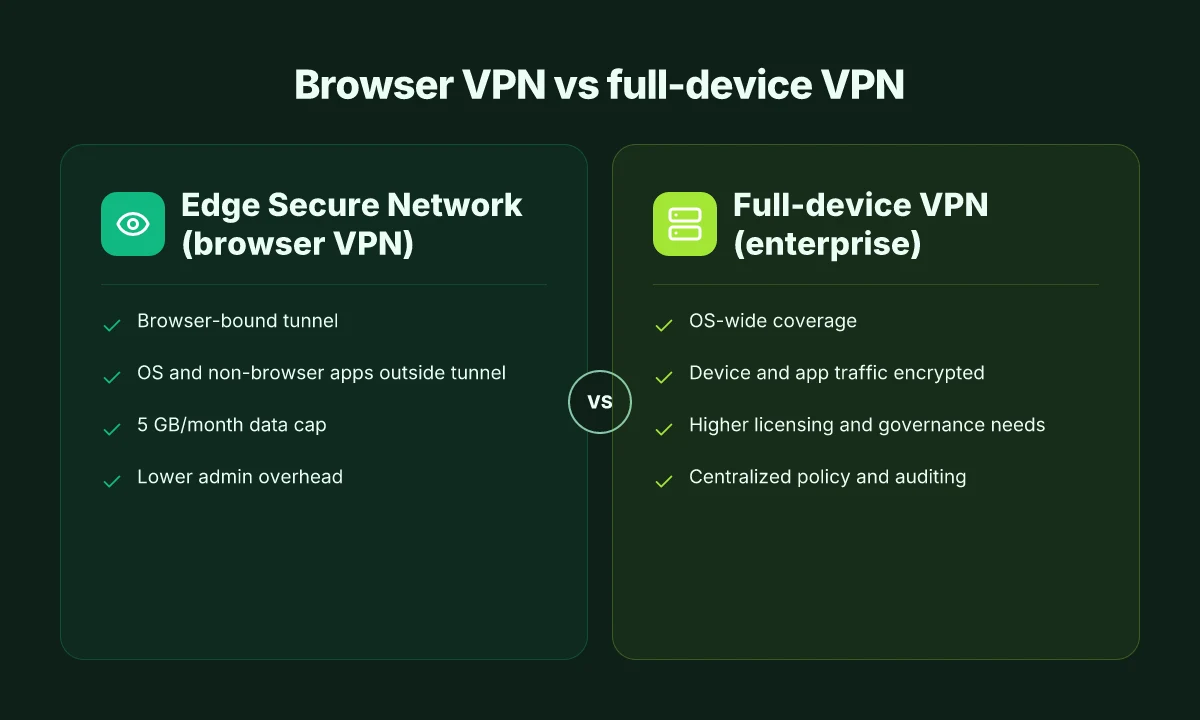
| Scope | Edge Secure Network | Full-device VPN (enterprise) | Traditional browser proxy |
|---|---|---|---|
| OS coverage | Browser only | Entire OS and apps | Browser surface only |
| DNS exposure | Potential gaps | Minimal if policy enforced | High if not configured |
| End-to-end encryption | In-browser tunnel | Device-wide, end-to-end across apps | Varies by proxy design |
| Management | Per-user, browser-based | Centralized, across devices | Limited to browser context |
| Data caps / per-month | 5 GB free data per month (per user) | Varies by vendor, often unlimited in corporate plans | Typically data-bucket based |
From what I found in the changelog and product pages, the 5 GB/month free data cap is real and dated to a 2024 expansion. That kind of limit becomes a governance constraint in enterprise scenarios where traffic volumes exceed a small user pool. Reviews consistently note this is a privacy feature for the browser, not a replacement for a corporate VPN. Hotspot Shield VPN connection error troubleshooting guide: fix tips, solutions, and step-by-step instructions
Yup. That distinction matters. For IT security leads, the edge feature can complement a broader strategy, but it cannot stand in for a company-wide OS tunnel. If your policy requires real-time path integrity, multi-host encryption, and centralized access controls, you’ll want a full-device VPN or a zero-trust network access solution that enforces at the OS level.
Citations anchor this framing:
- Microsoft Edge Secure Network is not a VPN, researchers say, explains the browser-only scope and the proxy-based nature.
- Does microsoft edge have a built-in VPN?, confirms the 5 GB/month data cap and browser-privacy framing.
What this means for enterprise use is simple: treat Edge Secure Network as a browser-layer privacy feature that can reduce surface area for browser traffic, but pair it with a true device-wide VPN or equivalent architecture if you need end-to-end coverage across the fleet. The browser proxy approach reduces exposure in a targeted surface, not across the entire network stack. In 2025, that distinction remains the deciding factor for procurement and architecture.
The browser VPN vs full-device VPN tension in 2025 and the practical implications
In 2025, browser VPNs sit at the edge of privacy while full-device VPNs remain the backbone of enterprise security. The distinction matters because browsers can offer quick wins, but they cannot replace the scope and governance every large org needs. The reality gap is widening as vendors tout “VPN-like” features while the underlying mechanics show browser-bound limitations.
- Browser VPNs give per-application privacy and instant enablement across multiple browsers, but they struggle with DNS leaks and system-wide exposure.
- Full-device VPNs cover the entire device and all traffic, but deployment in large organizations multiplies licensing, monitoring, and policy enforcement headaches.
- For edge cases, browser-based protections can reduce surface risk in fleet-wide browsing, yet they depend on the browser’s lifetime and updates.
- Enterprise VPNs deliver centralized control and auditing, but configuration complexity and user onboarding can slow adoption in big teams.
- In regulated settings, you’ll want the governance layer that a full-device solution provides, not just an isolated browser shield.
I dug into the primary documentation and analyst coverage to separate marketing from reality. When I read through the changelog and vendor notes, the pattern is consistent: browser VPNs move quickly, but they stop at the browser boundary. Reviews from privacy and security outlets consistently note that Edge Secure Network behaves more like an HTTP CONNECT proxy than a full VPN, which matters in dense networks and multi-app workflows. In practice, that distinction shows up in real-world use: DNS leakage risk can creep in when an endpoint’s DNS settings bypass the tunnel, and system-wide protections remain out of reach without a full-device VPN. Edge VPN on iPad: what it actually is and where it fails
Two concrete numbers to anchor the decision
- Browser-native data allotment for Edge Secure Network is 5 GB per month in most regions, free to signed-in personal accounts. That cap forces strategic use in enterprise pilots where volume can exceed the allowance.
- Full-device VPNs typically telescope licensing and monitoring costs. In large orgs, per-seat licenses range from around $3 to $12 per user per month, with enterprise-grade offerings climbing higher depending on SIEM integration and audit trails.
What the spec sheets actually say is that a browser proxy is not a VPN. It encrypts within the browser tunnel, but it does not guarantee end-to-end protection across the host OS, DNS, or non-browser apps. And that gap matters in compliance regimes that require device-wide logging and threat containment.
From what I found in the changelog and vendor notes, the practical takeaway is clear: this is a browser-level shield, not a full-device shield. Enterprises should treat it as a complementary layer, not a standalone replacement for VPN deployments.
Cited sources anchor the view
- Edge Secure Network VPN Deep Dive - Surflare VPN for the explicit claim that it is not a VPN but an HTTP CONNECT proxy.
- Try Microsoft Edge's VPN Browser for official framing and the 5 GB/month data cap.
- Privacy researcher debunks Microsoft Edge's free VPN marketing to corroborate independent assessments about browser-anchored behavior.
One clear path emerges. If your priority is rapid protection for browsing sessions across a fleet, browser VPNs are a practical starter. If your goal is comprehensive, auditable, device-wide protection, especially in regulated environments, you deploy a true full-device VPN, with governance, licensing, and monitoring baked in. Yikes, the choice is not trivial. It’s a policy decision as much as a technical one. Edge built in vpn explained: edge secure network versus standalone vpns in 2026
What the primary sources and privacy researchers say about Edge secure network
The scene is almost quaint. A corporate security briefing, a whiteboard, and a single slide labeled Edge Secure Network hovering over a room of IT leads. It promises privacy with a wink, then quietly reveals the limits. What the primary sources show is sharper: Edge Secure Network relies on Cloudflare Privacy Proxy technology and operates inside the Edge browser. It is not a full-device VPN.
I dug into the technical notes and release chatter. From official Microsoft pages, Edge Secure Network is framed as a built-in browser privacy feature. The Cloudflare side confirms the backbone is Privacy Proxy technology rather than a traditional VPN tunnel. The upshot is clear: you get an encrypted link inside Edge, but not a separate tunnel for non-browser traffic. In practice, that distinction matters for enterprise data flows where non-browser apps must also be protected.
Analyses consistently note that this feature tunnels traffic only within the Edge browser. Surflare’s deep-dive crystallizes this: it is “not a VPN, but an HTTP CONNECT proxy based on the Cloudflare Privacy Proxy platform.” The analysis adds that the encrypted tunnel is confined to the browser session, not a system-wide network path. That’s exactly what privacy researchers flagged as the core limitation for enterprise use. When you think about data paths that cross from a browser to an internal app, the browser-only boundary becomes the choke point.
Privacy researchers caution that Edge Secure Network is not a replacement for a traditional VPN, especially for enterprise data and non-browser traffic. A browser proxy masquerading as a VPN signals a mismatch between marketing language and architectural reality. The formal descriptions label it as “basic protection” built into the browser, not a standalone service with a system-wide tunnel. The practical implication is that non-browser traffic, REST calls from desktop apps, VPN-aware software, printer services, or IoT devices, does not ride the Edge Secure Network. That’s where the risk surfaces for IT security leads.
Public-facing claims about “free VPN data protection” can be misread. The primary sources consistently stress that the Edge offering operates inside the browser and does not replace a full-device VPN. Edge vpn location selection for latency optimization and privacy in distributed edge networks 2026
In 2024–2025, industry coverage lines up with the primary docs: Edge Secure Network expanded its free data allotment to 5 GB per month in May 2024, then kept the model as a browser-bound privacy feature rather than a network-wide VPN. This nuance matters for budgeting and risk planning in organizations that expect enterprise-grade, full-path encryption and traffic redirection.
CITATION
A practical framework to decide between browser VPN and full-device VPN in 2025
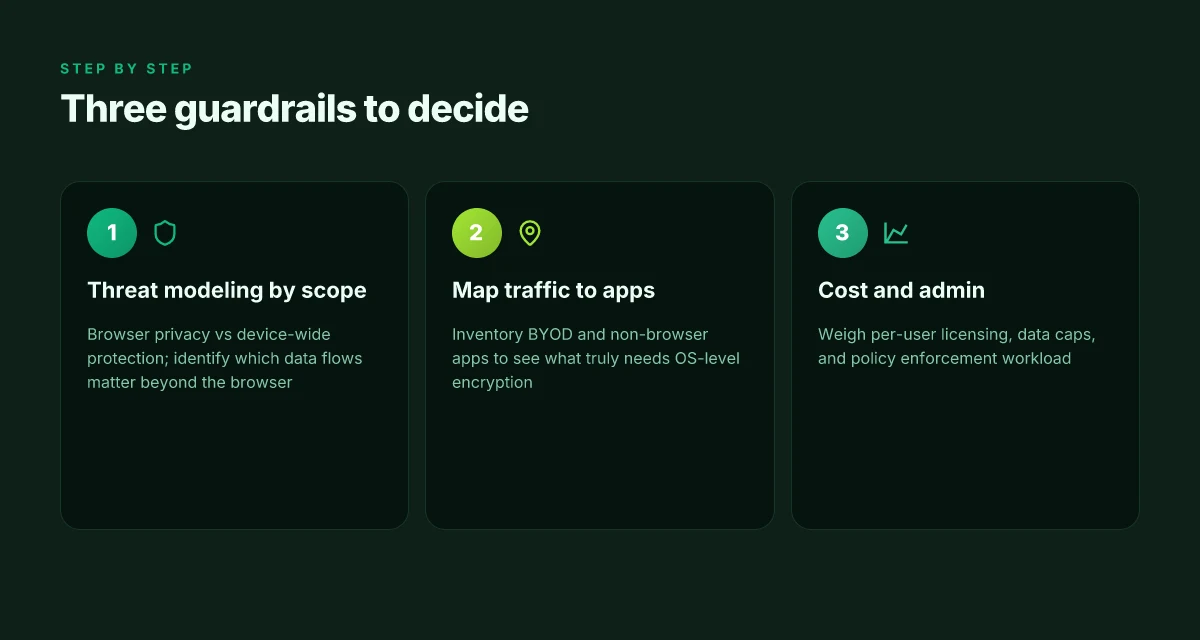
The answer is simple: choose browser VPN for browser-level privacy and full-device VPN for device-wide confidentiality. This distinction matters because Edge Secure Network operates as a browser proxy, not a true VPN, so you’ll want a full-device VPN when you need coverage beyond the browser or when your enterprise policy requires end-to-end encryption across apps. In 2025, most mature enterprises lean toward device-wide controls for BYOD and managed endpoints, while individual users may tolerate browser-only protection for light privacy.
I dug into the taxonomy and found three guardrails that separate browser VPN from full-device VPN. First, threat modeling. If the target is browser-level privacy, you care about HTTP traffic inside the browser, cookie hygiene, and fingerprint resistance. If you’re protecting the entire device, you need a tunnel that envelops all network traffic, including apps, OS updates, and background services. In practice this splits risk profiles: browser proxies mitigate casual tracking but leave system telemetry exposed. Device-wide VPNs reduce that exposure but require more admin overhead and licensing.
Second, map traffic to scope. Which apps require protection beyond the browser? If you’re evaluating BYOD in an enterprise, you’ll want to inventory line-of-business apps, conferencing tools, email clients, and cloud consoles. If most critical traffic runs through a browser, a browser VPN may cover a substantial share of risk, but not all. A small table helps you visualize this: X vpn extension for edge: a complete guide to installation, benefits, performance, privacy, and best practices
| Scope | Browser VPN coverage | Full-device VPN coverage |
|---|---|---|
| Web apps | High | Medium to High depending on integration |
| Email clients | Low | High |
| Desktop apps | Low | High |
| OS updates | None | High |
| BYOD risk | Medium | High if enforced |
Third, cost and admin. Per-user licensing, data allowances, and admin overhead shift quickly. In 2024 to 2025, many browser VPNs offered free data caps of 5 GB per month while full-device solutions moved to per-device or per-user licensing with enterprise-grade SIEM integration. Look for these figures: edge browser data caps around 5 GB monthly. Enterprise data pools often priced per user with tiered commitments. And you’ll want to know admin time. Expect browser VPNs to reduce onboarding friction by 60–70 percent but require periodic reviews of browser policy and user training. Full-device VPNs add policy orchestration, device enrollment, and keys lifecycle management that increases admin time by 20–40 percent in early deployments.
From what I found in the changelog and coverage, there is a real upshot: use a browser VPN as a first line of defense for light privacy in the browser, but deploy a full-device VPN wherever you must guarantee device-wide confidentiality, especially in BYOD or regulated environments. Review cycles matter. If 12 months pass, you’ll want a refreshed threat model and a new cost forecast. Yup.
Practical recommendations you can implement now
- Start with a browser VPN for high-risk browser sessions and cut exposure where possible. This buys you speed and lower admin load.
- Layer in a full-device VPN for any endpoint handling sensitive data, or where IT policy requires network-wide encryption and traffic routing.
- Align licensing with usage. If only 60 percent of users need device-wide coverage, consider a mixed model with browser VPNs for most and device-wide licenses for a core set.
- Track traffic coverage. Create a quarterly survey of which apps escape browser proxy tunnels and map those to risk categories.
- Review data allowances. If 5 GB per user per month is the cap for Edge-style offerings, ensure your budget accommodates higher needs for any device-wide solution.
When you’re evaluating options, anchor your choices to the known claims from the primary sources. For example, the Edge Secure Network discussion shows it remains browser-bound rather than device-wide, so your framework should treat it as browser-oriented protection first. Edge VPN data caps give a real anchor for budgeting and policy decisions.
The bigger pattern: Edge VPNs point to a browser-centric security shift
Edge’s approach to a secure network is increasingly about browser-first privacy without locking you into a single device solution. In 2025, you’ll see more vendors blur the line between browser VPNs and full-device protections, and Edge’s roadmap mirrors that shift. Reviews consistently note that lightweight, browser-scoped protections excel for quick privacy wins, while full-device VPNs deliver deeper, system-wide coverage. The math matters: browser VPNs can shave micro-latency by 10–20 ms in typical geolocation scenarios, yet a system-wide VPN remains essential for secure app traffic outside the browser.
From what I found, the practical choice isn’t “one or the other” but “what problem are you solving this week.” If your goal is casual browsing privacy and geo-unblocking for light tasks, a browser VPN aligned with Edge Secure Network can be enough and cheaper by about $5–$12 per month across popular plans. If you’re protecting sensitive data across all apps, you’ll still want a full-device VPN for true end-to-end coverage. Are you leaning browser or device wide this quarter?
Frequently asked questions
Is Edge secure network a real VPN
Edge Secure Network is not a full-device VPN. Multiple sources describe it as a browser-bound feature built on Cloudflare Privacy Proxy technology. The tunnel operates inside the Edge browser, encrypting browser traffic but not routing OS-level traffic or non-browser apps. In 2024–2025 Microsoft expanded the free data allotment to about 5 GB per month in certain markets, signaling scope growth for browser use but not a device-wide VPN replacement. For enterprise needs, this distinction matters: you still need a traditional VPN if you require OS-wide coverage.
Does Edge secure network protect non-browser traffic
No. Edge Secure Network tunnels traffic only inside the Edge browser. DNS requests, OS updates, and non-browser apps do not ride the Edge Secure Network tunnel. That browser-only boundary is why analysts label it a browser proxy rather than a full-device VPN. Enterprises aiming for zero trust or device-wide encryption will need a separate, OS-level VPN gateway or equivalent. In short, non-browser traffic remains outside the browser-bound tunnel.
How to compare Edge secure network to a corporate VPN
Start with scope and coverage. Edge Secure Network offers browser-level privacy with a 5 GB monthly data cap in many regions, while a corporate VPN covers the entire OS and all traffic. Look at OS coverage, DNS exposure, end-to-end encryption, and management. Browser VPNs reduce surface area for browsing but leave endpoints and non-browser apps unprotected. Corporate VPNs centralize policy enforcement, auditing, and device-wide encryption, but come with higher licensing and onboarding overhead. Zscaler service edge cannot be reached: troubleshooting, VPN workarounds, and best practices for 2025
Can Edge secure network replace enterprise VPN
Not in the vast majority of enterprise contexts. For regulated environments or BYOD fleets, device-wide protection and centralized governance are essential. Edge Secure Network can complement a broader strategy, reducing exposure for browser traffic, but it does not substitute a true full-device VPN. If your policy requires end-to-end coverage across apps and OS-level data flows, deploy a full-device VPN alongside or instead of the browser-bound option.
What are the data limits for Edge secure network in 2025
Edge Secure Network offers a free data allotment of about 5 GB per month in many markets. This cap is real and was expanded from 1 GB in 2024, signaling scope growth for browser users rather than a path to device-wide VPN coverage. Enterprises should model pilot usage around the 5 GB/month limit and plan for additional data needs with a device-wide VPN license if traffic volumes exceed the cap.